Your AI does 10× more work on the same tokens.
Instead of burning tokens re-reading whole files, your AI gets the knowledge pre-distilled via a local MCP server: modules and contracts from your code, totals and aggregates from your spreadsheets, the essentials of your documents and emails. Less re-reading, less spend: up to 50% fewer tokens per task.
- [✓]Code, spreadsheets and documents
- [✓]Up to 50% fewer tokens
- [✓]10× more work per session
- [✓]Local-first and private
$ search_context("why is the payments webhook failing")
→ card + finding: contract, callers, proven fix
$ query_dataset("SELECT category, SUM(total) FROM sales")
→ totals per category from sales_2025.xlsx — without opening the sheet
return context ready — up to 50% fewer tokens▌
The problem
Re-reading whole files burns tokens
When an AI starts cold, it burns tokens and time re-reading files to reconstruct how everything fits: the repo, the forty-column spreadsheet, the contracts folder. Context is lost between sessions and every task pays for the re-read again. The bigger the project, the pricier every prompt.
The solution
Distilled context = more work per token
CODE-RAG indexes your sources —code, spreadsheets, documents, emails— and generates per-module or per-file cards with an LLM: what's there, how it's used, what it depends on, and if it's data, totals and aggregates already computed. Your AI retrieves only what's relevant via semantic search and opens only what it will touch — up to 50% fewer tokens per task. The more complex the project, the better it works.
- [·]Per-module or per-file cards generated by an LLM, not dumps.
- [·]Bring what's relevant, not half the repo or the whole spreadsheet on every prompt.
- [·]Up to 10× more tasks on the same token budget.
Who it's for
Repos, spreadsheets, contracts, papers, emails: if your work lives in files, your AI does more with CODE-RAG.
Developers
Your agent re-reads half the repo every session and context doesn't survive /clear.
Per-module cards with contracts, dependencies and past bugs. Every fix is indexed as a finding: the RAG improves with use.
Accountants and firms
Balances, ledgers and statements scattered across twenty spreadsheets nobody wants to open.
Detects account, debit and credit columns automatically and precomputes a trial balance and a per-account, per-month ledger. Ask in plain language; it answers with numbers.
Economists and finance
Series, reports and datasets you have to reopen for every single question.
Totals per month, quarter and category precomputed at indexing time, plus ad-hoc read-only SQL over your files with query_dataset.
Data science
Project context lives in huge CSVs, loose databases and scattered docs.
Indexes datasets (CSV, Parquet, SQLite) alongside your Python or R code in the same RAG. Your AI queries schemas and aggregates without loading the dataset into the prompt.
Business and back office
Contracts, manuals, budgets and emails scattered across folders and inboxes.
The 'Business' profile indexes documents and data together: Word, PDF —even scanned ones, with optional OCR—, Outlook emails and spreadsheets. All local: nothing goes to the cloud.
Freelancers and marketing
Proposals, assets, campaign metrics: every answer means rebuilding the context by hand.
One RAG per project or client: index the folder and ask conversationally from your AI app (Claude, GPT…). Without writing a single line of code.
Don't code? No problem: you use it conversationally, from Claude, GPT or your MCP-enabled AI app. See all formats →
How it works
Three simple pieces. Your files never leave your infrastructure.
Index on your GPU
The indexer discovers modules and files, generates cards with the LLM and vectorizes them. If there's data, it precomputes totals per column, date and category. Runs on your machine or on a GPU box shared over Tailscale.
Serve via local MCP
A local MCP server exposes the knowledge to your AI through its tools. No third parties, no uploading your files to the cloud.
Consume from your AI
Claude, GPT or whichever MCP client you prefer: your coding agent for programming, a chat app for everything else. The AI requests context through the tools and opens only what it needs. Each finding is re-indexed and improves the system.
The 6 core MCP tools
search_context
Distilled context via semantic search.
query_dataset
Read-only SQL over your spreadsheets and data.
get_card
The full card for a module.
get_module_map
The index of an area of the repo.
record_finding
Records a debugging finding.
feedback
Marks useful/useless (tunes scoring).
See it live
A real, polished product: the real-time 3D viewer, the 2D relationship graph, the live dashboard and the query that opens the distilled context. All captured from the product actually running.
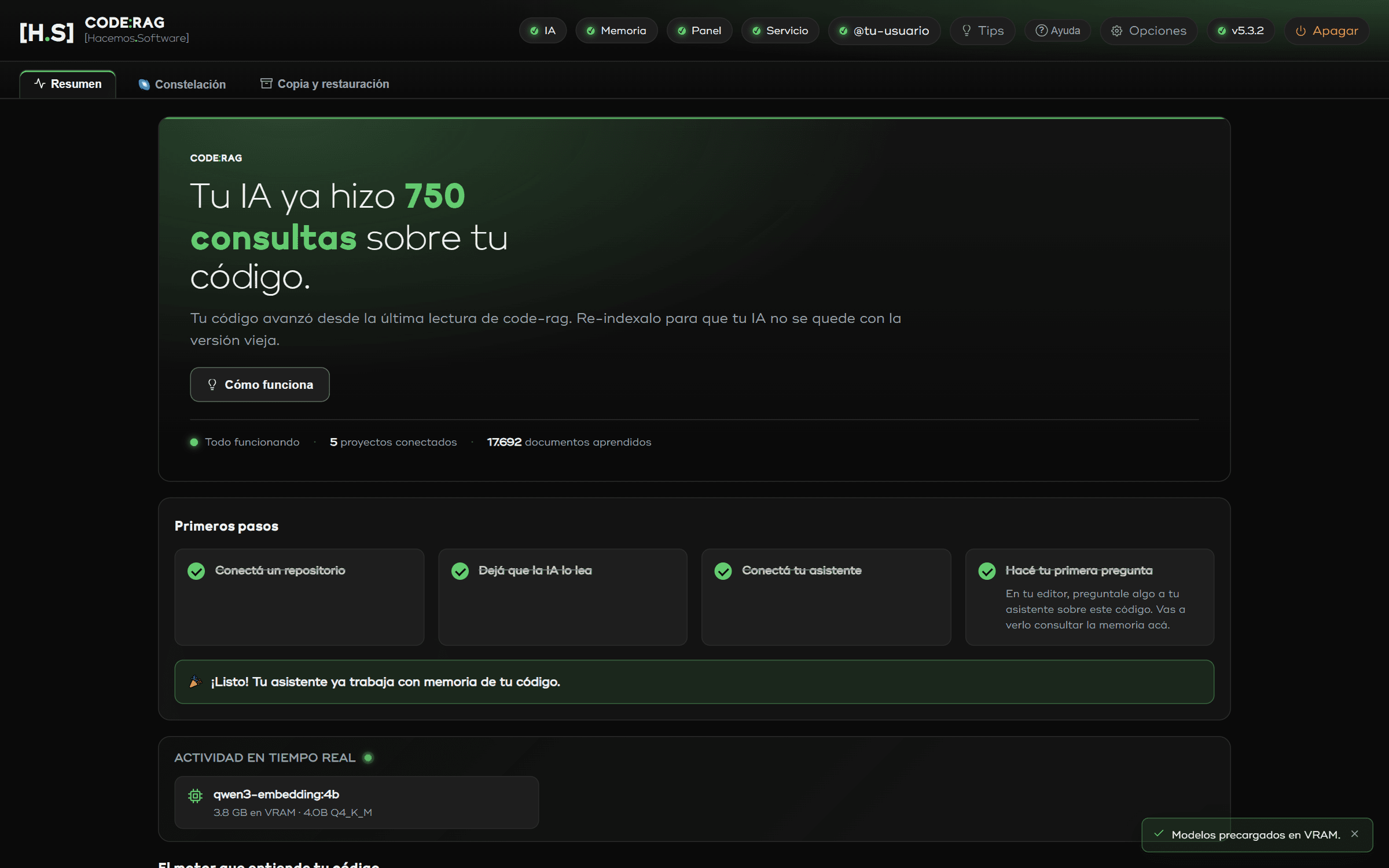
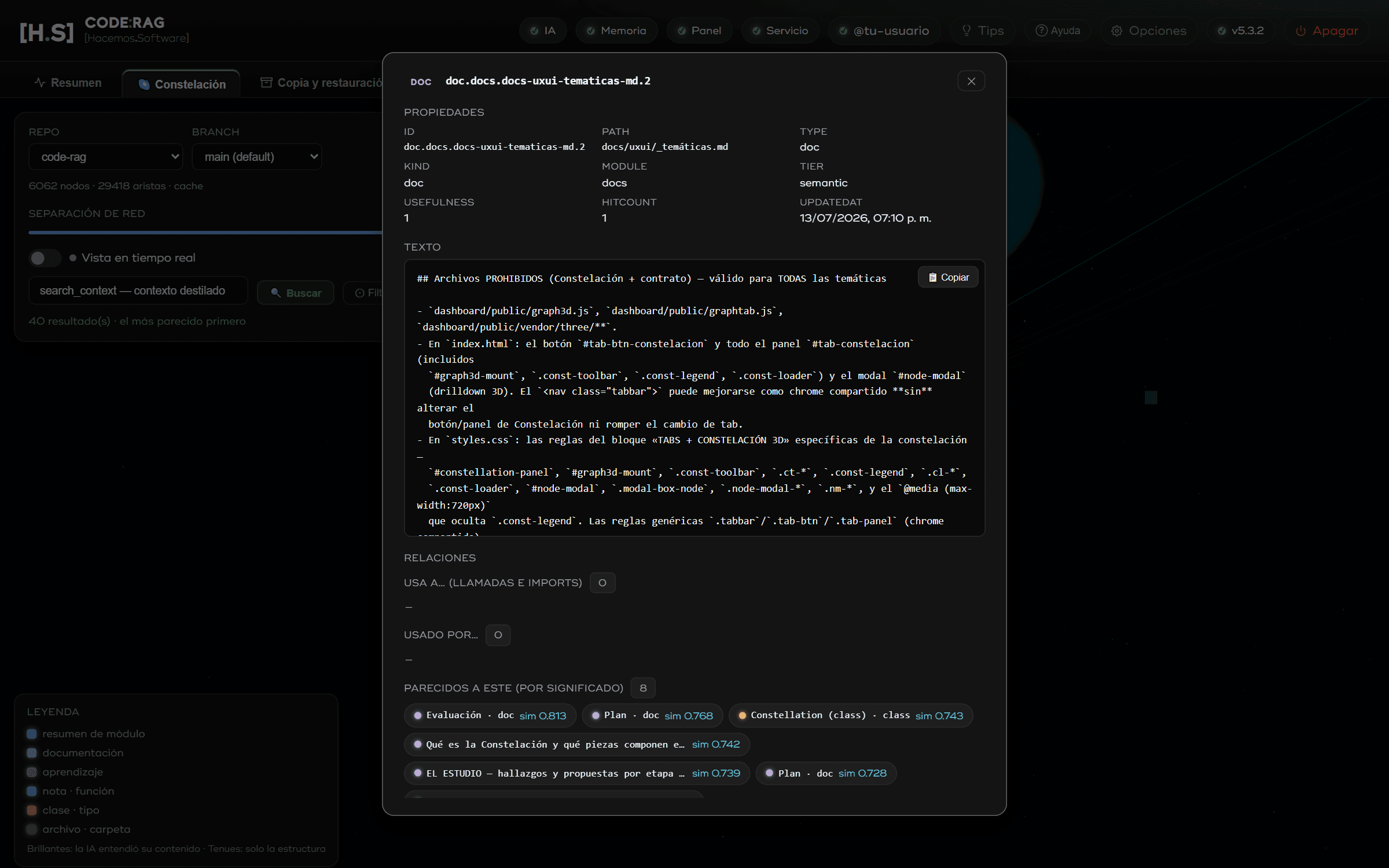

Real screenshots and video — no mockups.
Features
Fewer tokens, more useful work. For software teams and for anyone who lives among spreadsheets and documents — no hype.
Self-improving
Every solved bug or insight is indexed as a finding. A usefulness score (reinforcement by use + decay of the stale) surfaces the proven and fresh first.
Local-first and private
Indexing and models run on your infra (a GPU). Neither your code nor your data leaves for third parties. Local mode (all on your machine) or local + server (GPU box over Tailscale).
Ask your spreadsheets
Instant read-only SQL with query_dataset (DuckDB) over Excel, CSV, JSON, Parquet or SQLite. Plus precomputed aggregates: totals per month and category, even a trial balance if there's accounting data.
Multi-project, with dashboard
Each repo or working folder with its own independent RAG —index, store and observability dashboard with two views of your knowledge: the 3D 'Constellation' and the 2D relationship graph— sharing GPU and network. Scale to all your projects and clients.
Works with Claude, GPT and more
Connects via MCP (6 core tools) to Claude Code, Claude Desktop, VS Code and any MCP-speaking client, and adds the /aprende skill, which indexes findings straight from the session.
Distilled context, not grep
Per-module or per-file cards + semantic retrieval: your AI understands the project without re-reading all of it. Fewer input tokens, more budget to reason.
Formats
Everything is indexed and queried locally. These are the file families CODE-RAG understands today.
Documents
Prose and notes
Spreadsheets
Data and databases
Bank statements
Images and scans
Code
Some heavy parsers (PDF, Excel, YAML, SQLite, Parquet) use optional dependencies and are skipped with a notice if missing. OCR is opt-in (RAG_OCR=1) and requires Tesseract installed; it reads Spanish and English by default.
Pricing
Monthly subscription that pays for itself with the tokens you save. Ultimate also available as a one-time payment (perpetual). No trial.
Lite
To get started on your machine, one project.
- Local only
- 1 project
- 1 device(s)
- Self-improvement (findings + scoring)
- Observability dashboard
- 6 MCP tools + /aprende skill
- Email support
Pro+
Local + server, up to 3 projects.
- Local + server
- 3 projects
- 3 device(s)
- Self-improvement (findings + scoring)
- Observability dashboard
- 6 MCP tools + /aprende skill
- Email support
Ultimate
Fully unleashed: unlimited projects and optional perpetual.
- Local + server
- Unlimited projects
- 5 device(s)
- Self-improvement (findings + scoring)
- Observability dashboard
- 6 MCP tools + /aprende skill
- Email support
Prices in USD, taxes may apply.
Cancel anytime from your payment provider. The license runs until the end of the paid period.
FAQ